Hold several buildings to one standard
Running three buildings means three sets of paperwork drifting apart at different speeds. The Sites dashboard puts every site's SOPs, reviews, training, coverage and standards on one screen, and network standards let you publish a procedure once and push it to the sites that do not have it yet.
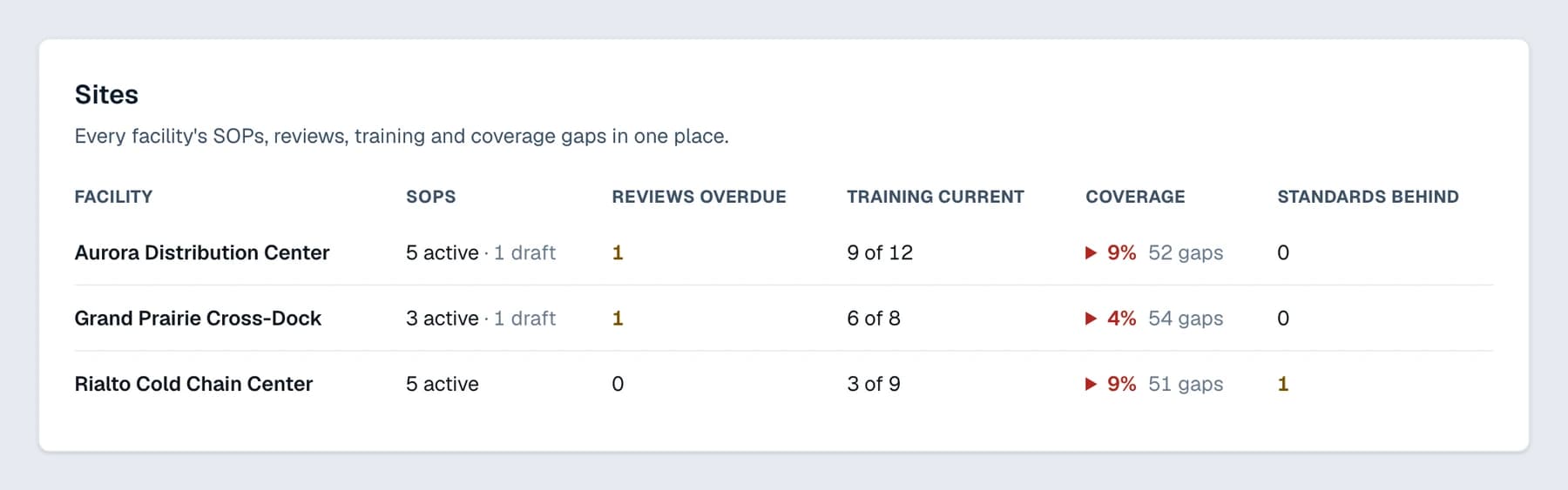
Every site on one screen, including the one that is behind
One table, one row per site, showing SOPs, reviews due, training, coverage of the recommended set, and how many standards that site has not adopted yet. The site that is drifting is the one you can see at a glance.
Multi-Site only
Publish once, adopt everywhere
Write the procedure at one site, publish it as a network standard, and copy it to the others. Each site adopts it as its own SOP, and the dashboard shows which sites have not.
Multi-Site only
Priced per building, never per worker
The people you are trying to train are not a line item. No plan caps the workers on the roster; what a plan buys is how many buildings the account covers, how many people can administer it, and which capabilities are open.
Every plan
Buildings and seats, plan by plan
The building and seat allowance below is read from the same limits the app bills against. No plan counts the workers on the training roster, and the capability split between the three plans is on the pricing page.
- Starter
- 1 facility
1 admin seat - Pro
- 1 facility
3 admin seats - Multi-Site
- 3 facilities, then $49 a month for each one after that
9 admin seats
Reading this page costs nothing. Everything on it is part of the product, on plans from $79 a month per building, and the plan lines above are read from the limits each plan actually opens. You can start a 14-day free trial with no card.
The procedures behind this are in the library. Read the Management Systems templates to see what one looks like before you generate it, or browse all of the warehouse SOP templates.
The rest of what it does
SOP generator
Templates fitted to your building, citing the paragraph each compliance procedure satisfies.
Training records and sign-off
Sign-offs on a tablet, pinned to the revision, with expiry dates that chase you.
Audit binder
Active SOPs, approvals, history, training and floor cards as one indexed PDF.
Coverage map and change watch
The recommended set for your building, with what is written, draft or missing.
Toolbox talks
A weekly one-page talk from any active SOP, included on every plan.